Pages: [1]   Go Down

Author Topic: focus stacking  (Read 6723 times)

griffithimage

  • Newbie
  • *
  • Offline Offline
  • Posts: 37
focus stacking
« on: March 11, 2009, 02:24:26 pm »

Hi I'm going to be doing some macro shooting in the future and I am worried about depth of field. I've seen some automated focus stacking programs available. Does anyone have any experience with these? Recommendations?

Luis Argerich

  • Full Member
  • ***
  • Offline Offline
  • Posts: 155
  • Astrolandscaper
    • http://www.luisargerich.com/
focus stacking
« Reply #1 on: March 11, 2009, 03:51:04 pm »

I think there are several threads like this one, if you ask me I'd recommend Helicon Focus, Tufuse and/or Combine ZM for the focus stacking.

Luigi

PeterAit

  • Sr. Member
  • ****
  • Offline Offline
  • Posts: 4647
    • Peter Aitken Photographs
focus stacking
« Reply #2 on: March 11, 2009, 08:23:09 pm »

Quote from: luigis
I think there are several threads like this one, if you ask me I'd recommend Helicon Focus, Tufuse and/or Combine ZM for the focus stacking.

Luigi

You can do it right in CS4. I do not have enough experience to be able to say if CS4's focus stacking competes with the other programs, but it seems to work quite well.  Here's a closeup of an orchid created from a stack of 5 images, taken with a Nikkor 60mm macro lens on a D80.

Peter

Logged

elf

  • Full Member
  • ***
  • Offline Offline
  • Posts: 244
focus stacking
« Reply #3 on: March 12, 2009, 12:35:58 am »

Quote from: PeterAit
You can do it right in CS4. I do not have enough experience to be able to say if CS4's focus stacking competes with the other programs, but it seems to work quite well.  Here's a closeup of an orchid created from a stack of 5 images, taken with a Nikkor 60mm macro lens on a D80.

Peter

I've found that CS4's output just isn't good enough for anything other than small web images.  This shows most of the problems with it:
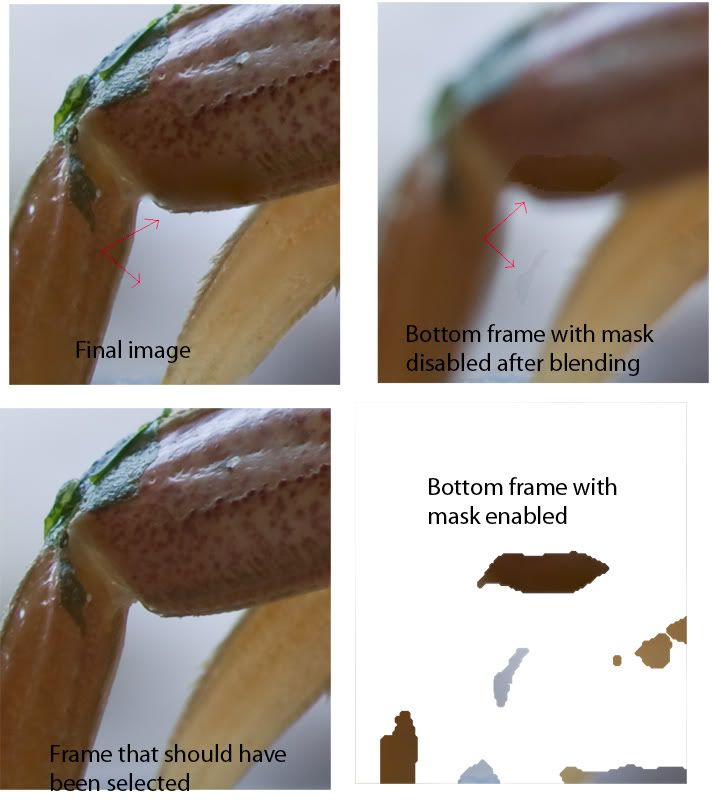
It has hard edges on the masks that can't be feathered because only the unmasked areas have been color blended. It modifies the image instead of a mask, so the changes can't be reversed (at least without a lot of hassle).  It also can't reliably select the best focused parts of an image.  

It's really too bad Adobe didn't put a little more effort into this.  It's one of the reasons I upgraded to CS4 only to be disappointed in it.

p.s. I think a normal macro stack for me has  over 20 images with 60 being average. CS4 may work better for landscapes than for macros.

I haven't used Helicon Focus, but everything I've seen and read about it put it and CombineZP about equal. The big difference is CombineZP is (mostly) free.

Manual blending is still the best and most accurate as far as color accuracy, but software can usually do a little better with ghosting.
« Last Edit: March 12, 2009, 12:40:17 am by elf »
Logged

PeterAit

  • Sr. Member
  • ****
  • Offline Offline
  • Posts: 4647
    • Peter Aitken Photographs
focus stacking
« Reply #4 on: March 12, 2009, 08:56:34 am »

Quote from: elf
I've found that CS4's output just isn't good enough for anything other than small web images.  This shows most of the problems with it:

It has hard edges on the masks that can't be feathered because only the unmasked areas have been color blended. It modifies the image instead of a mask, so the changes can't be reversed (at least without a lot of hassle).  It also can't reliably select the best focused parts of an image.  

It's really too bad Adobe didn't put a little more effort into this.  It's one of the reasons I upgraded to CS4 only to be disappointed in it.

p.s. I think a normal macro stack for me has  over 20 images with 60 being average. CS4 may work better for landscapes than for macros.

I haven't used Helicon Focus, but everything I've seen and read about it put it and CombineZP about equal. The big difference is CombineZP is (mostly) free.

Manual blending is still the best and most accurate as far as color accuracy, but software can usually do a little better with ghosting.


I have worked some with CombineZ and found that you often get halos around sharp edges in the final image. Also, it will not work with 16 bit images. It looks like focus stacking is an imperfect science and you might need to have more than 1 tool on hand.

Peter
Logged

DarkPenguin

  • Guest
focus stacking
« Reply #5 on: March 12, 2009, 11:21:34 am »

I've been using CS4 and fixing errors with the clone tool.  Just clone from the appropriate image in the stack.

That's my 2 test images of experience talking here.  And I haven't done this with macro macro.  Just macroish macro.
Logged

elf

  • Full Member
  • ***
  • Offline Offline
  • Posts: 244
focus stacking
« Reply #6 on: March 12, 2009, 04:08:57 pm »

Quote from: DarkPenguin
I've been using CS4 and fixing errors with the clone tool.  Just clone from the appropriate image in the stack.

That's my 2 test images of experience talking here.  And I haven't done this with macro macro.  Just macroish macro.

That will work when you only have a few images to work with, but it doesn't scale.  The crab legs are part of a larger panorama with perhaps 500 images (I don't have access to the images right now to give the exact number).  The final image would have to absolutely stunning before devoting the amount of time required for manual tweaking and blending.
Logged

spotmeter

  • Sr. Member
  • ****
  • Offline Offline
  • Posts: 329
    • http://www.photographica.us
focus stacking
« Reply #7 on: March 12, 2009, 10:18:25 pm »

Quote from: griffithimage
Hi I'm going to be doing some macro shooting in the future and I am worried about depth of field. I've seen some automated focus stacking programs available. Does anyone have any experience with these? Recommendations?

Photo Acute works well. But you need to get a focus rail instead of using your lens change focus. If you use your lens, you will have alignment problems. They are less with a focus rail. I use the one from Really Right Stuff
Logged

elf

  • Full Member
  • ***
  • Offline Offline
  • Posts: 244
focus stacking
« Reply #8 on: March 13, 2009, 02:53:10 am »

Quote from: spotmeter
Photo Acute works well. But you need to get a focus rail instead of using your lens change focus. If you use your lens, you will have alignment problems. They are less with a focus rail. I use the one from Really Right Stuff


I really haven't found this to be a problem with the software that aligns the image.  All of the software packages can handle small X and Y movements of the camera and also the change in size when focusing.  What they can't handle perfectly is subject movement in relation to the background.

CombineZP and Helicon Focus have aligning built in. TuFuse normally uses PTAssembler. CS4 can also be used to just align.  I like Microsoft ICE for doing the aligning, then I either use CombineZP or manually blend for focus.

I've used the lens to change focus, a focus rail where both camera and lens move, and bellows where just the camera is moved.  All of them work fine, but the latter gives the most control and the most options.
Logged
Pages: [1]   Go Up