Pages: 1 ... 42 43 [44] 45 46 ... 78   Go Down

Author Topic: DCamProf - a new camera profiling tool  (Read 757565 times)

AlterEgo

  • Sr. Member
  • ****
  • Offline Offline
  • Posts: 1995
Re: DCamProf - a new camera profiling tool
« Reply #860 on: September 14, 2015, 03:05:31 pm »

it depends. You can regenerate XYZ values from spectra if spectra is available in the file, otherwise it needs XYZ. Likewise it can regenerate RGB values from SSF if SSF is provided, otherwise it needs RGB values.

With no spectra, the minimum should be:

SAMPLE_ID RGB_R RGB_G RGB_B XYZ_X XYZ_Y XYZ_Z

(it currently does not parse Lab values, it wants XYZ)

so I can surely construct the file myself like this with 2 parts, 2 set of fields :

1) RGB_R RGB_G RGB_B  fields I can extract (rawdigger) from the actual raw shot, and those will be used by dcamprof along with the JSON profile data to come to what conversion from the actual raw shot shall be

+

2) spectral data (or XYZ) so that dcamprof can compare the values from the above (received from actual RGB from the raw + applied profile) with what target values are under the specific illumination

Logged

Frederic_H

  • Full Member
  • ***
  • Offline Offline
  • Posts: 156
    • www.fredericharster.com
Re: DCamProf - a new camera profiling tool
« Reply #861 on: September 14, 2015, 03:37:51 pm »

Globally, it looks a lot more saturated than 0.97 and 0.98

Release of the day: 0.9.9

Added the IT8.7/2 parsing and refined the change I made yesterday in 0.9.8.

Now the tone reproduction uses both RGB-HSV based luminance and pure luminance to get "best of both worlds". The pure luminance is used for high chroma colors, such as the red tulips, while the luminance based on a RGB-HSV curve is used for low and normal saturation colors.

The pure luminance curve is more "correct", but as a curve is as a perceptual model is not "correct" anyway it's not really valid argument. What I've seen earlier (together with the RT team) is that the RGB-HSV-based luminance lighten shadows in a way that simply looks better. The difference is very small, but after some further testing I decided that it was worth bringing it back. With a smooth transition into a pure luminance curve for high saturation colors the good tonal separation properties are kept.
« Last Edit: September 14, 2015, 03:48:29 pm by Frederic_H »
Logged

torger

  • Sr. Member
  • ****
  • Offline Offline
  • Posts: 3267
Re: DCamProf - a new camera profiling tool
« Reply #862 on: September 14, 2015, 03:50:46 pm »

Globally, it looks a lot more saturated than 0.97 and 0.98

There should be a very small difference. Are you sure that there's not something else in your process that has changed? I'll double-check on my side.

EDIT: I see your example now, I could possible have missed that, I made a last minute change that I did not fully verify... I'll look into it.
« Last Edit: September 14, 2015, 03:53:38 pm by torger »
Logged

Frederic_H

  • Full Member
  • ***
  • Offline Offline
  • Posts: 156
    • www.fredericharster.com
Re: DCamProf - a new camera profiling tool
« Reply #863 on: September 14, 2015, 03:56:12 pm »

I've checked on a couple of pics with profiles based on CC24 and IT8, strangely blues seem to be more affected than other hues ?
Logged

torger

  • Sr. Member
  • ****
  • Offline Offline
  • Posts: 3267
Re: DCamProf - a new camera profiling tool
« Reply #864 on: September 14, 2015, 04:02:22 pm »

Error confirmed... I'll take down the 0.9.9 and put it up again when fixed, I think it's a last minute bug....
Logged

torger

  • Sr. Member
  • ****
  • Offline Offline
  • Posts: 3267
Re: DCamProf - a new camera profiling tool
« Reply #865 on: September 14, 2015, 04:10:46 pm »

Now a new 0.9.9 is out, let's pretend that never happened :). I had made a last minute debug check by turning off mid/high chroma rolloff, and forgot to turn it back on before releasing.

I just uploaded a fixed archive.
Logged

Frederic_H

  • Full Member
  • ***
  • Offline Offline
  • Posts: 156
    • www.fredericharster.com
Re: DCamProf - a new camera profiling tool
« Reply #866 on: September 14, 2015, 04:28:12 pm »

Fixed indeed. I'll check more thoroughly tomorrow, for now I see some changes in very high chroma values and can't say what looks "best" yet.
Logged

torger

  • Sr. Member
  • ****
  • Offline Offline
  • Posts: 3267
Re: DCamProf - a new camera profiling tool
« Reply #867 on: September 14, 2015, 04:40:52 pm »

Fixed indeed. I'll check more thoroughly tomorrow, for now I see some changes in very high chroma values and can't say what looks "best" yet.

In high chroma it could be just "different" rather than better, the change did not really intend to make changes there. What I looked at is the shadowy parts of a face, a dark shadow can look something like 1-2 deltaE brighter. It's a tiny difference but I remember the lengthy work in July when I and the RT team (mainly Michael Ezra) tuned the curve stuff for skin tones, and that little difference was needed to get it right.

In saturated tones the difference between the RGB-HSV and luminance only is large, so in the transition area (25 to 65 chroma, ie wide transition) one should detect differences if doing A/B swapping, this is not intended as an improvement or anything like that, just a transition.

The intention with 0.9.9 is that the "old" curve (0.9.7) is used on normal saturation colors and the luminance curve (0.8.2, 0.9.8 ) is used on high saturation colors. And the two reasons the old curve is used on normal saturation colors is that we had better results on shadowy skin tones, and that it makes it easier to import curves designed in other contexts as most curves are designed in some RGB-like situation.
« Last Edit: September 14, 2015, 04:43:44 pm by torger »
Logged

AlterEgo

  • Sr. Member
  • ****
  • Offline Offline
  • Posts: 1995
Re: DCamProf - a new camera profiling tool
« Reply #868 on: September 14, 2015, 07:37:29 pm »

0.9.9 build for Windows ( mingw = dcamprof.exe + libgomp_64-1.dll + both manual & tutorial / = copies of Torger's web pages / in 3 formats : IE archive .mht, Mozilla archive .maff and regular .pdf ) : https://app.box.com/s/aj53xxbw2jy77uw4vdilk6ubathikb8p
Logged

Frederic_H

  • Full Member
  • ***
  • Offline Offline
  • Posts: 156
    • www.fredericharster.com
Re: DCamProf - a new camera profiling tool
« Reply #869 on: September 15, 2015, 02:13:35 am »

In high chroma it could be just "different" rather than better, the change did not really intend to make changes there. What I looked at is the shadowy parts of a face, a dark shadow can look something like 1-2 deltaE brighter. It's a tiny difference but I remember the lengthy work in July when I and the RT team (mainly Michael Ezra) tuned the curve stuff for skin tones, and that little difference was needed to get it right.

In saturated tones the difference between the RGB-HSV and luminance only is large, so in the transition area (25 to 65 chroma, ie wide transition) one should detect differences if doing A/B swapping, this is not intended as an improvement or anything like that, just a transition.

The intention with 0.9.9 is that the "old" curve (0.9.7) is used on normal saturation colors and the luminance curve (0.8.2, 0.9.8 ) is used on high saturation colors. And the two reasons the old curve is used on normal saturation colors is that we had better results on shadowy skin tones, and that it makes it easier to import curves designed in other contexts as most curves are designed in some RGB-like situation.
Below is what can be observed in high chroma areas in 0.9.9 and 0.9.7 (I would have said it was a 0.9.8 profile but according to your explanations it must be 0.9.7).
There's nothing obvious going on in the shadows.
« Last Edit: September 15, 2015, 02:15:25 am by Frederic_H »
Logged

torger

  • Sr. Member
  • ****
  • Offline Offline
  • Posts: 3267
Re: DCamProf - a new camera profiling tool
« Reply #870 on: September 15, 2015, 02:28:04 am »

Below is what can be observed in high chroma areas in 0.9.9 and 0.9.7 (I would have said it was a 0.9.8 profile but according to your explanations it must be 0.9.7).
There's nothing obvious going on in the shadows.

Thanks for the example. 0.9.7 and 0.9.9 is using the same curve for low to normal saturation curves, so they should be exactly the same there (except for possibly some microscopic differences due to a simplification of mixing code), but 0.9.9 transitions into a pure luminance curve for high saturation colors. This means more focus on tonal separation rather than maintaining chroma. The largest difference is observed in orange/reds.

Very bright saturated orange/reds becomes more desaturated in 0.9.9 which is observed in this example. In this particular example I'd say the 0.9.7 rendering is better as it keeps the chroma of the lights and as the lights are flat and featureless anyway there's no gain of tonal separation. The 0.9.9 also suffers from that the orange is so bright it's pushed into the heavily desaturated range. But that's the way it is, it's not possible to make one profile that is best for all situations. The 0.9.9 is more all-around which can be demonstrated on the tulip pictures, so that's what I'm going to prefer as the default.

However, with 0.9.9 it's possible to configure the curve transition of the neutral tone reproduction operator, if you want the 0.9.7 behavior you can enable that by setting:
   "Curve": { "KeepFactor": 1.0 ... } (that is keep factor to 1.0 then the base RGB-HSV curve is never faded out)
in an ntro_conf.json and provide that with the -o option. See data-examples/ntro_conf.json for a full example and documentation.
« Last Edit: September 15, 2015, 02:31:59 am by torger »
Logged

Frederic_H

  • Full Member
  • ***
  • Offline Offline
  • Posts: 156
    • www.fredericharster.com
Re: DCamProf - a new camera profiling tool
« Reply #871 on: September 15, 2015, 06:27:04 am »

Considering what I shoot most of the time, the former curve is preferred. Nice to have the option for high chroma cases though.

There are some stretches in my LUT I want to fix. I wanted to give gnuplot a try but some data are missing in my dump. All I have is the icc-lut.dat, so how can I generate the others ?

 splot \
    'icc-lut.dat' w d lc "beige", \
    'gmt-locus.dat' w l lw 4 lc rgb var, \
    'gmt-adobergb.dat' w l lc "red", \
    'gmt-pointer.dat' w l lw 2 lc rgb var, \
    'target-icc-lutve.dat' w vec lw 2 lc "black", \
    'targetd50-xyz.dat' pt 5 ps 2 lc rgb var
Logged

Frederic_H

  • Full Member
  • ***
  • Offline Offline
  • Posts: 156
    • www.fredericharster.com
Re: DCamProf - a new camera profiling tool
« Reply #872 on: September 15, 2015, 06:48:15 am »

As usual I'm not at my best screen (I'm moving this autumn so my work places are more chaotic than usual), but I think I can see that the main difference between P1 and DCamProf's result is that P1 is a fair bit warmer, ie more yellow. I've noted this in many bundled profiles, also Phocus for my Hassy warms up the colors a bit, but less global. I think a slight warmup in the green to yellow range can be an advantage for many landscape scenes (sunlit foliage) so I have that in the "look" example I provide in the tutorial, but I avoid applying it to blues, reds and shadows.
Phase One should have a look at the Leaf Product curve and profiles and build them for their IQ backs. Not everyone is shooting sunny landscapes only, so a more neutral and less yellowy Daylight or Flash profile would be welcomed I guess...
Given how "easy" it is to create a rather neutral profile with Dcamprof and a simple CC24, it baffles me they haven't released one. Most IQ owners I personally know are doing fashion/portrait and their import presets all have quite strong corrections applied through C1 color editor.

/rant over
Logged

torger

  • Sr. Member
  • ****
  • Offline Offline
  • Posts: 3267
Re: DCamProf - a new camera profiling tool
« Reply #873 on: September 15, 2015, 06:53:59 am »

There are some stretches in my LUT I want to fix. I wanted to give gnuplot a try but some data are missing in my dump. All I have is the icc-lut.dat, so how can I generate the others ?

I haven't documented it very well (ie not at all) but different dcamprof commands produce different data. If you only have the icc-lut.dat you probably have only dumped data for the make-icc command. To get all those files you should dump data for the make-profile command.
« Last Edit: September 15, 2015, 06:56:43 am by torger »
Logged

torger

  • Sr. Member
  • ****
  • Offline Offline
  • Posts: 3267
Re: DCamProf - a new camera profiling tool
« Reply #874 on: September 15, 2015, 07:04:02 am »

Considering what I shoot most of the time, the former curve is preferred. Nice to have the option for high chroma cases though.

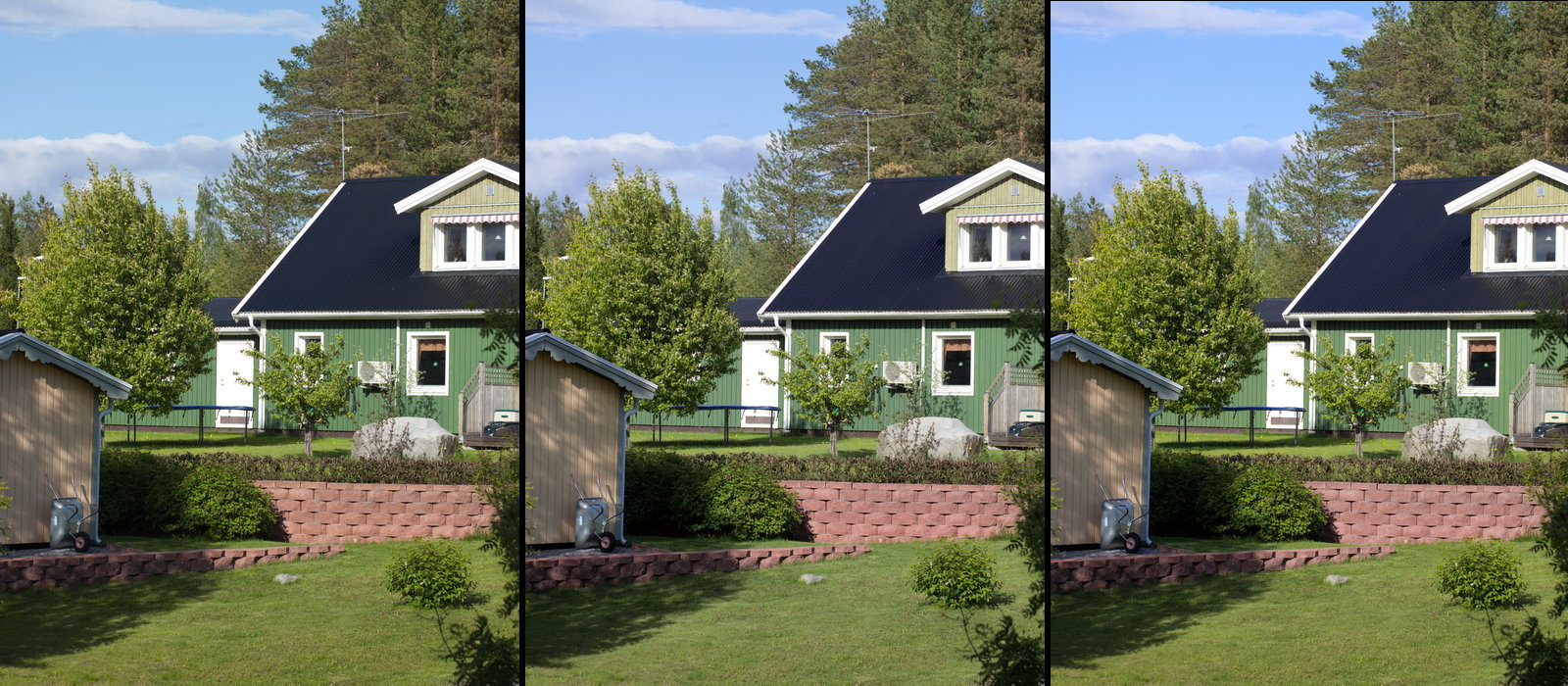
If you want less desaturation of bright colors the "Rolloff" section has an even more powerful impact. Again, the default is adapted for "all-around photography" which means that there's quite long transition with much desaturation, this makes things like high key portraits look better (otherwise the look a bit tonally compressed and dull in the highlights). However it will also make things like blue skies more desaturated than they need to be. Changing the KeepFactorHueCurve output to 0.40 instead of the default 0.20 can be a good starting point for experimenting with that. An example picture with a bright blue sky is good for testing the effect. With the example custom look provided the KeepFactor is varied over the hue range, with a lower value in skin tone range and a higher value in cyan-blue-magenta (skies).

Default:
        // How much of the correct color to keep above high limit. Can be adjusted per RGB-HSV Hue
        "KeepFactorHueCurve": {
            "CurveType": "Linear",
            "CurveHandles": [ [ 0,0.20 ], [ 360,0.20 ] ]
        },

Suggested alternative to try:
        // How much of the correct color to keep above high limit. Can be adjusted per RGB-HSV Hue
        "KeepFactorHueCurve": {
            "CurveType": "Linear",
            "CurveHandles": [ [ 0,0.40 ], [ 360,0.40 ] ]
        },


The center image below is with 0.20, and the right is with 0.40 (the left is ACR, ignore that). Look at the sky to see the difference. The right also contains other look changes, such as the warmup discussed previously, you would not use that :)
« Last Edit: September 15, 2015, 07:07:33 am by torger »
Logged

Frederic_H

  • Full Member
  • ***
  • Offline Offline
  • Posts: 156
    • www.fredericharster.com
Re: DCamProf - a new camera profiling tool
« Reply #875 on: September 15, 2015, 07:09:54 am »

Thanks, the dumps were made with make-icc only, I'll try with make-profile now.

I will test your suggestions, so far the 0.97 behaviour along with a slight desaturation of close to neutral colors (custom look) is giving me a rather good starting point.
Logged

torger

  • Sr. Member
  • ****
  • Offline Offline
  • Posts: 3267
Re: DCamProf - a new camera profiling tool
« Reply #876 on: September 15, 2015, 07:14:00 am »

will test your suggestions, so far the 0.97 behaviour along with a slight desaturation of close to neutral colors (custom look) is giving me a rather good starting point.

Great. Did you have any example of the black-point problem mentioned a few posts back so I can look into that, or has it been fixed? I suspect that it could be a "custom look" type of thing rather than a bug, but in any case it's worth investigating.
Logged

Frederic_H

  • Full Member
  • ***
  • Offline Offline
  • Posts: 156
    • www.fredericharster.com
Re: DCamProf - a new camera profiling tool
« Reply #877 on: September 15, 2015, 07:33:33 am »

I fixed this one by trial and error, changing values in the json file rather than trying to duplicate the curve in C1 and using those values.

When it comes to mimicing a curve the best approach may be to roughly get there with C1 curve editor, and then fine tune the values in the json file.
Logged

torger

  • Sr. Member
  • ****
  • Offline Offline
  • Posts: 3267
Re: DCamProf - a new camera profiling tool
« Reply #878 on: September 15, 2015, 07:42:24 am »

I fixed this one by trial and error, changing values in the json file rather than trying to duplicate the curve in C1 and using those values.

When it comes to mimicing a curve the best approach may be to roughly get there with C1 curve editor, and then fine tune the values in the json file.

Ok, great. I'll add that tip to the tutorial.
Logged

Frederic_H

  • Full Member
  • ***
  • Offline Offline
  • Posts: 156
    • www.fredericharster.com
Re: DCamProf - a new camera profiling tool
« Reply #879 on: September 15, 2015, 02:27:54 pm »

My setup (OS X + aquaterm) doesn't let me navigate the plot and locate the bad patches precisely. Unfortunately I won't have time to investigate further in the coming days.
Time to let someone else keep Anders busy ;)
Logged
Pages: 1 ... 42 43 [44] 45 46 ... 78   Go Up